Creating games is no longer complicated or something only professional programmers can do. With Scratch, anyone, including beginners and children, can learn to make games in a fun and accessible way. Scratch is a visual programming platform that helps users understand programming logic without writing complex syntax.
With Scratch, you can design characters, choose backgrounds, and intuitively control how objects move and interact in your game. Learning becomes more interactive because you can immediately see the results of each command.
What Is Visual Coding?
Visual coding is a programming method that uses graphical elements in the form of code blocks. These blocks can be arranged like puzzle pieces to build a program's logical flow. This approach is especially suitable for beginners because it does not require an understanding of complicated programming syntax.
Visual coding allows users to focus on fundamental concepts such as logic, structured thinking, and problem solving. This makes learning to program feel more approachable, enjoyable, and easy to understand, especially for children.
Getting to Know Scratch
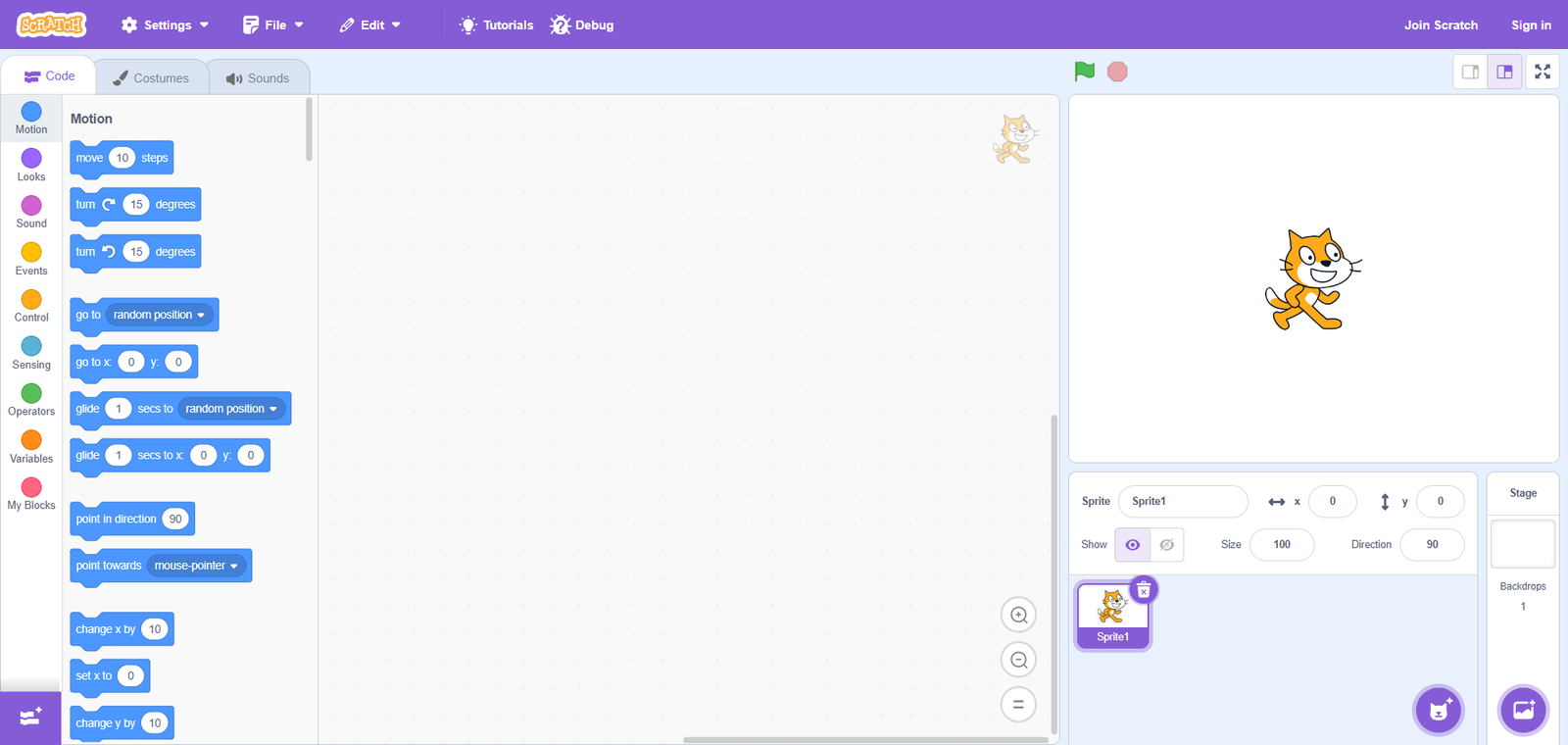
Scratch is one of the world's most popular visual coding platforms. Students, educators, and beginners use it to create games, animations, and a wide range of interactive projects.
The Scratch interface is designed to be easy to understand and welcoming to new users. Its main components include the following.
1. Stage
The Stage is the main area where all objects and animations are displayed. This is where the elements of your game or animation interact.
2. Sprite
A sprite is a character or object in a project. Each sprite can have its own behavior, appearance, and sounds to suit the project's needs.
3. Blocks Palette
This section contains code blocks grouped by function, including movement, control, appearance, sound, and logic.
4. Scripts Area
The Scripts Area is where users arrange code blocks to control a sprite's behavior. The blocks placed here determine how the sprite responds within the project.
5. Costumes
Costumes let users change a sprite's appearance. By switching between several costumes, a sprite can appear to move or animate.
6. Sounds
In this section, users can add sound effects or music to enrich the interactive experience in a game or animation.
7. Backdrop Library
Backdrops set the background of the Stage. Users can choose from the available backgrounds or create their own to suit their project.
Together, these elements allow users to create interactive projects without typing code manually.
Making a Game in Scratch: The Catching Apple Project
Step 1: Prepare the Sprites and Backdrop
Prepare the sprites and backdrop you will need: an apple sprite, a bowl sprite, and a background that fits your game's theme.
Step 2: Set Up the Bowl Sprite's Movement
First, make the bowl move left and right using the following code.
Step 3: Create the SCORE Variable
Next, create a variable to store the score. Click the Variables menu, then select Make a Variable.
Name the variable SCORE, then click OK.
Step 4: Set the Apple Sprite's Starting Position
The following code sets the apple's position so that it can appear and fall from a random location.
Step 5: Make the Apple Fall and Update the Score
Next, make the apple appear at a random location and fall downward. This code also adds points when the apple touches the bowl and subtracts points when it touches the ground.
Step 6: Set a Score Limit
The final coding step is to set a score limit that determines when the game ends. In this example, the limit is 35 points.
Step 7: Time to Share Your Story!
Now, tell your friends about the project you have just created. Which sprites and backdrop did you use? How does the game work?
Conclusion
Scratch is an ideal platform for beginners who want to learn how to make games while understanding the basics of programming. Its interactive visual approach makes learning to code enjoyable and easy to follow.
If you would like a more structured way to learn Scratch with guidance from experienced teachers, getting started can be easier than you think. Join a course at Koding Akademi and begin creating your first game with greater confidence.